
Ship Address
QuickBooks and Sage 50 (Peachtree)
Both QuickBooks and Peachtree accept shipping addresses. If you’re exporting to either of these packages, ShopPAK attempts to include the job’s shipping address.
No Job “Ship To” Address Exists
ShopPAK creates an invoice export record that indicates no “Ship To” information exists for the invoice.
Job “Ship To” is Identified via a ProjectPAK Record
ShopPAK sends over the ship to address based on the ProjectPAK business record that the user identified as containing the ship to address.
Job “Ship To” Manually Entered By User
ShopPAK handles a manually entered “Ship To”, but the user needs to be careful to enter the ship to address as shown below so the accounting package properly receives and displays it:
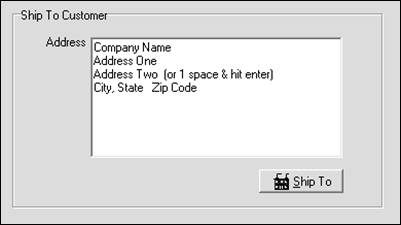
IMPORTANT: Make sure a manually entered “Ship To” adheres to the above sequence. If it doesn’t, ShopPAK will display an error message saying it can’t create the export file because of a ‘bad’ ship address.
|
Note: If only one address line is needed, the user must enter a blank row on line three as shown below:
|
ABC Company
234 Elm Street
Atlanta, GA 30311