
Job Reference
QuickBooks (export files), QuickBooks (Integrated) and Sage 50 (Peachtree)
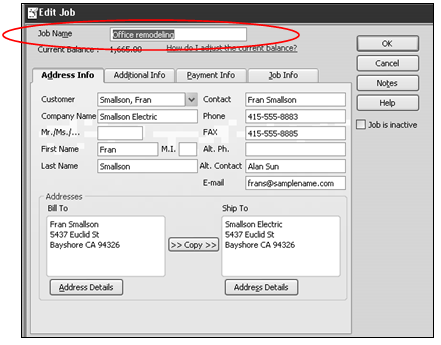
When exporting Accounts Receivable customer invoices to QuickBooks or Peachtree, you have the option of including a reference to the ShopPAK job. The job must already exist in the accounting package. For example, in QuickBooks, you would need to create the job prior to sending invoices from ShopPAK via the QuickBook’s “Edit Job” dialog box:
Note: The only exception is QuickBooks (integrated). The QuickBooks (integrated) interface can create a job reference dynamically if one doesn’t exist in QuickBooks.
|
If you want to include ShopPAK Job references when exporting invoices, you need to place a check into ShopPAK Options | Accounting tab | Include job reference checkbox.

QuickBooks (export files) and QuickBooks (integrated)
ShopPAK sends the ShopPAK “Job Description” located on the Job Details form to QuickBooks. Make sure that the ShopPAK Job Description EXACTLY matches the QuickBook’s “Job Name”.
Note: If the user requests job information be sent via QuickBooks (export files) method, but fails to manually add a corresponding Job in QuickBooks prior to the importing, the invoice will still import with the ShopPAK Job Description concatenated to the QuickBooks’ customer name, but no associated ‘job information’ will be created. This is not true if you use the QuickBooks (integrated) approach. The job will be automatically created if it doesn’t exist in QuickBooks.
|
Sage 50 (Peachtree)
ShopPAK sends the ShopPAK “Job Id” located on the Job Details form to Peachtree. Make sure that the ShopPAK Job Id EXACTLY matches the Peachtree’s Job Id.
Sage 100 (MAS 90/200)
ShopPAK ALWAYS sends MAS 90/200 the ShopPAK Job Id and Job Description. It requires this information be included in the import file. Make sure that the ShopPAK Job Id matches the MAS 90/200 Job Id before creating the export file.