
Reservation Quantity Rounding
ShopPAK lets you control reservation quantity rounding. On the Miscellaneous tab in ShopPAK Options, you have 4 choices for rounding reservation quantity. If you want to reserve exactly what the job requires, select ‘Don’t round up. This is what we did in the example above.
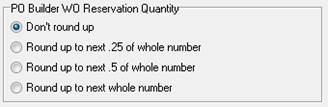
However, this can also create partial sheets in inventory when the work order material requisition sheet isn’t a whole number. For that reason, you may want to set up PO Builder WO Reservation Quantity to round up to the next whole number.