
Vendor Code / Name
When exporting AP reconciled invoices, the vendor code / name must match the corresponding vendor code / name in your accounting package. ShopPAK does not create a new vendor record in your accounting package. It must already exist. The only exception is transfering data to QuickBooks via the QuickBooks (integrated) method. You can use ProjectPAK’s business record import or export capabilities to sync ProjectPAK with your accounting package, or you can enter vendor names manually in ProjectPAK and your accounting package. Make sure they match exactly.
Note: If the Vendor form’s “Name” field matches your accounting package’s vendor name or code, then the export utility uses the “Name” field. However, if you use vendor codes instead of descriptive names in your accounting package, you need to create vendor codes in ProjectPAK.
Note: If you use vendor codes instead of a full name, you’ll need to create vendor codes in ProjectPAK via the ProjectPAK ‘More’ fields as shown below.
|
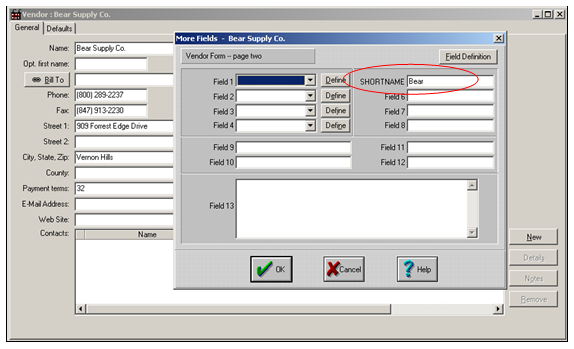
ProjectPAK More Fields
From a ProjectPAK vendor record, click the user defined “More Fields” speedbar button  . This displays the “More Fields” dialog box for the vendor record. “More Fields” allow you to create custom data fields in ProjectPAK. If you are using vendor codes in your accounting package, you must create a custom vendor “More Field” called -> SHORTNAME (It must be in all caps exactly as shown here). Any custom field will work, just make sure you define the field tag exactly as shown here -> SHORTNAME.
. This displays the “More Fields” dialog box for the vendor record. “More Fields” allow you to create custom data fields in ProjectPAK. If you are using vendor codes in your accounting package, you must create a custom vendor “More Field” called -> SHORTNAME (It must be in all caps exactly as shown here). Any custom field will work, just make sure you define the field tag exactly as shown here -> SHORTNAME.For information on creating more fields, refer to the ProjectPAK User’s Guide, “Chapter 13 – Creating New Database Fields”.
In the example above, the accounting package refers to “Bear Supply Co.” as simply “Bear”, and thus, we had to create the corresponding vendor code -> “Bear” on the ProjectPAK side in the special SHORTNAME custom field.
When ShopPAK sends an AP Invoice to your accounting package, it first checks if there is a SHORTNAME custom field value for the vendor record. If so, it sends the SHORTNAME value to the accounting package. If it doesn’t find a SHORTNAME code, it sends the full vendor name as defined in the Vendor ‘Name’ field.