
ShopPAK Report Setup
Once you have selected your filtering, option, and sort criteria, ShopPAK will display the “Report Setup” dialog box.
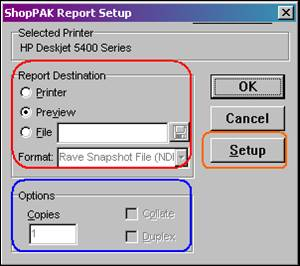
The default “Report Destination” is to preview the report  . Some reports/documents have a specific printer icon
  available to send the report/document directly to a printer. The Report Setup allows you to send reports to the screen, a printer or a file. Adobe PDF or RTF (Rich Text Format) file formats are currently supported. This is a handy tool in paperless environments or if you want to attach the report to an email message.
. Some reports/documents have a specific printer icon available to send the report/document directly to a printer. The Report Setup allows you to send reports to the screen, a printer or a file. Adobe PDF or RTF (Rich Text Format) file formats are currently supported. This is a handy tool in paperless environments or if you want to attach the report to an email message.You can also type the number of “Copies” you want to print
“Setup” is available if you need to change settings or destination for the selected printer prior to generating output.