
Sequence Button
The “Sequence” dialog box gives you options for organizing and filtering materials.
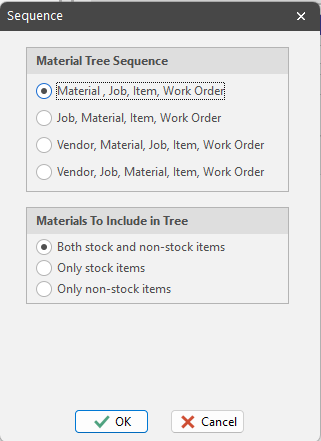
Material Tree Sequence
Material, Job, Item, Work Order
Organizes material need by specific material, and under each material, shows all the jobs that need the material. Within a given job, see the Job Items and Work Orders calling for the material. Choose this approach when you want to combine several jobs’ material needs on a single purchase order.
Job, Material, Item, Work Order
Organizes material need by specific job. Under each job, see the materials that the job requires, and under each material, the specific Job Item and Work Orders that need the material. Choose this approach when you want to ‘single thread’ material purchases by specific job.
Vendor, Material, Job, Item, Work Order
Organizes material need by vendor. Under each vendor, see the materials that they supply, and under each material, the jobs that are calling for the material. Within a given job, see the Job Items and Work Orders calling for the material. Choose this approach when you want to quickly build POs for a specific vendor that combine several jobs’ material needs on a single purchase order.
Vendor, Job, Material, Item, Work Order
Organizes material need by vendor. Under each vendor, see the jobs that are calling for materials that the vendor supplies. Under each job, see the materials that the job requires, and under each material, the specific Job Item and Work Orders that need the material. Choose this approach when you want to quickly build POs for a specific vendor for a specific job.
Materials To Include in Tree
Both Stock and Non-Stock Items
Tells PO Builder to include all candidate materials in the material tree - regardless of whether or not they are inventory items.
Only Stock Items
Tells PO Builder to only include inventory items in the material tree.
Only Non-Stock Items
Tells PO Builder to only include non-inventory items (direct purchase materials) in the material tree.
Jobs To Include In Tree
If you sequence materials by job, you can filter materials to only show those materials where you are the project manager. In other words, if you organize the material tree by job, it is likely that you only want to purchase materials for those jobs that you are managing.
ShopPAK remembers material sequence and filtering choices between sessions for each ShopPAK user. When you choose the PO Builder main tab, you’ll see the current sequence displayed next to the “Sequence” button.
