
Relationship to PO Builder
One of ShopPAK’s unique and powerful tools is PO Builder. It helps you analyze material needs across different jobs, quickly generate direct material purchase orders that identify job specific quantities, and place job specific reservations against inventory items.
PO Builder is linked to the work order ‘Materials’ grid. To make a material ‘visible’ to PO Builder make sure its ‘PO Builder Ready’ or ‘Force PO Builder’ checkbox is checked. Once checked, the material shows up on the PO Builder material tree…..until it has been purchased or reserved. Then it falls off.
If you don’t manage materials via the ‘Materials’ grid, then you can’t use PO Builder. This is one of the compelling reasons to use the ‘Materials’ sub tab to list material needs.
Another benefit of using the ‘Materials’ grid to manage material takeoff is ShopPAK updates material status as materials are purchased, received, and picked from inventory as shown below.
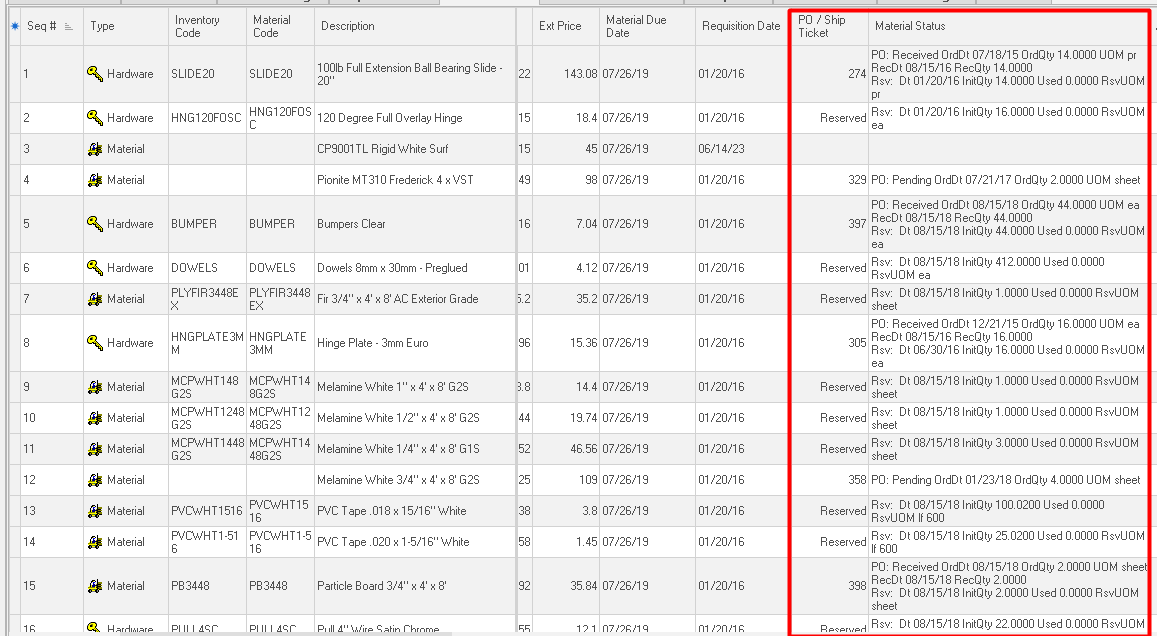
ShopPAK also keeps the material grid’s vendor assignment and vendor stock number in sync with changes in PO Builder.
The ‘Materials’ tab helps project managers with material requisitioning and helps them stay on top of material status – one of the key critical success factors when managing production schedules.