
PC Data Collection Controller
The controller continually checks the PC workstations, looking for completed shop floor data collection transactions. When a new transaction is found, the PC Data Collection Controller edits the transaction for errors and converts the data collection transaction into the appropriate ShopPAK records. For example, if it encounters a new Time Clock transaction, it creates a ShopPAK time and attendance record. If it encounters a Labor transaction, it creates a ShopPAK labor job costing record. If an error is detected, it creates a ShopPAK error record.
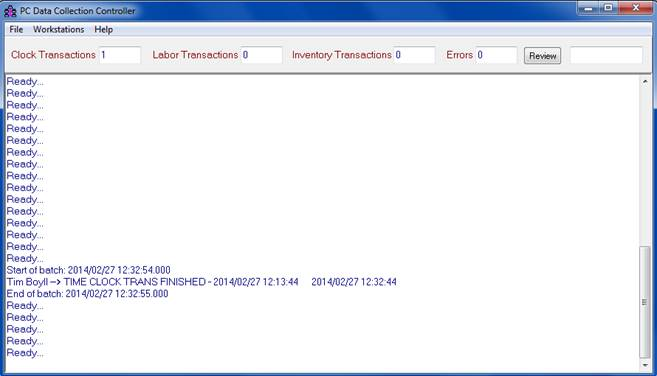
You can run the PC Data Collection Controller on any networked PC, provided the controller can communicate with the PC Data Collection workstations and the shared ShopPAK database. We recommend running the controller on the PC that also runs the shared ShopPAK database. This should improve performance and throughput, since this PC is probably a dedicated server with more RAM and speed than your other PCs throughout the office.
To start the PC Data Collection Controller:
1. Click Start | Programs | ShopPAK | PC Data Collection Controller.
Once running, you can simply minimize the controller. It displays the transactions it has recently processed, or displays a “Ready...” message.
WARNING: Make sure only one instance of the PC Data Collection Controller is running on your network.
|
The Controller has a menu item called -> Workstations, with one item under it:

The only time you’ll use this is when updating ShopPAK to a newer version and the update contains a database schema change. Rather than shutting down ALL of the Shop Floor Data Collection workstations manually, click the menu item and the Controller sends a message to all the workstations to disconnect from the shared database. Thus, they won’t conflict with running the database update. Once you finish installing the software update, start the Controller again and uncheck the menu item. This tells all the workstations to reconnect to the database.