
Overtime Rules
ShopPAK offers a powerful tool to calculate employee overtime for both “Time and Attendance” and “Job Cost Actuals” hours. To set your overtime calculation rules, select Define | Overtime Rules from the menu:
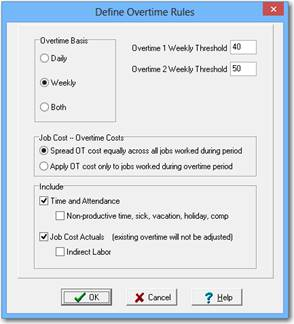
Overtime Basis
This option will set the basis of how overtime is calculated – either daily, weekly or both.
Overtime 1 and 2 Threshold
The threshold number of hours for OT1 and if needed, OT2 should coincide with your OT Basis,
ie: OT1 = 40 for Weekly, OT1 = 8 for Daily.
The Apply Overtime Rules (located under the ShopPAK “Tools” menu) processes all selected transactions for a specified week regardless if it is set up for a Daily or Weekly OT Basis.
Job Costs – Overtime Costs
When calculating overtime for job costing purposes, you have two choices. You can either spread overtime equally across all jobs that an employee with overtime worked during the week or the day, or you can have ShopPAK simply apply overtime to those jobs that were worked once the employee crossed the overtime threshold number of hours.
Note: If cost selection = Spread Labor OT costs across all jobs, Indirect Labor operations are excluded when calculating the ratio of OT hours to spread from job to job.
|
Time and Attendance
Check this box if you want employee Time and Attendance records included in the AutoCalc batch run.
Include Non-productive time; sick, vacation, holiday, comp
Tells ShopPAK if non-productive time should be included in the accumulated counts when calculating overtime. The Non-productive time only affects Time and Attendance overtime thresholds.
Job Cost Actuals
Check this box if you want ShopPAK to include labor actuals when determining overhead thresholds and automatically changed to an OT rate when applicable.
Indirect Labor
Tells ShopPAK if you want indirect labor hours considered when determining overhead thresholds.