
Material Grid Column Explanations
Type
Includes ProjectPAK line types Material and any user defined line types mapped as a ShopPAK material item.
Inventory Code
Read only. If the material is an inventory item, ShopPAK displays its inventory code.
Material Code
If you define ProjectPAK Library items with a code, and if the material is a ProjectPAK Library item, ShopPAK displays the material code.
Description
Material description. You can edit the description if you want to add specific information such as color, grade, size, etc. However, be aware that ShopPAK uses material description when it retrieves purchase history for a particular PO Item. If you edit the description to specify a particular occurrence of a generic material, make sure you edit it the same way every time so you get ALL PO Items when you request purchase price history.
Ppak Quantity
Read only. If you use the ProjectPAK Conversion Utility to build ShopPAK products, any material that was estimated will show up in the Materials grid and will have a ProjectPAK quantity.
Quantity
Initially, Quantity matches the ProjectPAK quantity. If the ProjectPAK quantity isn’t correct, change the Quantity column to forward the right quantity to purchasing.
UOM
Unit of Measure. The list of user defined values comes from the ProjectPAK UOM definition.
NOTE: If you estimate in one unit of measure but purchase in another unit of measure, define ProjectPAK Conversion Utility unit of measure conversion formulas. See “Chapter 5 – ProjectPAK Estimate Conversion”, for more information.
|
Ppak Unit Price
Read only. If you use the ProjectPAK Conversion Utility to build ShopPAK products, any material that was estimated will show up in the Materials grid and will have a ProjectPAK unit price.
Unit Price
Initially, Unit Price matches the ProjectPAK unit price. If the ProjectPAK unit price isn’t correct, change the Unit Price column to forward the right unit price to purchasing.
Extended Price
Read only. Price of the material. ShopPAK multiplies Quantity times Unit Price.
Overhead Markup Percentage
The overhead markup percentage associated with the material. This percentage defaults to the value you’ve entered into ShopPAK Options on the Job Costing tab:
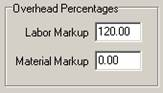
If the material is an inventory item, ShopPAK checks to see if you’ve entered a specific overhead percentage. If so, it overrides the default material markup with the specific inventory item material markup percentage.
Overhead markups help recoup ‘fixed’ burden and are used on various job costing reports when calculating net margins.
GL Account Code
Expense GL Account code that the material belongs with.