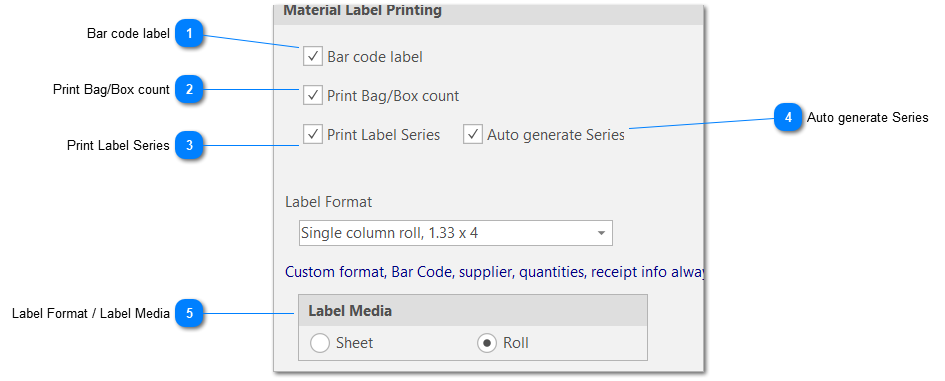
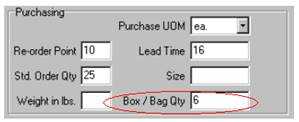
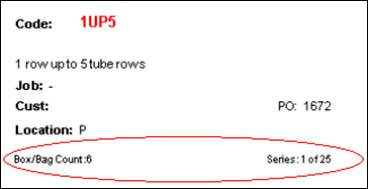
“Box/Bag Count” will allow you to include how many units are within a box or container. This information is available for Inventory Items on the Inventory ‘Details’ sub tab when generating labels from the Inventory tab.
It is also available on the ‘Purchasing’ tab and the ‘Receiver’ tab.
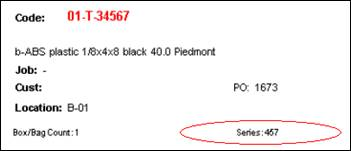
“Label Series” identifies a related set of material labels (e.g. “1 of 3”, “2 or 3”, “3 of 3”). This information is maintained on the Receiving form. If ‘Auto-generate Series’ is not enabled, any value you enter into this field will print at the base of each material label. In the example below, a value of 457 was entered into the Label Series column on the Purchasing, PO Item form. This information can also be updated upon receipt from the Receiving form.
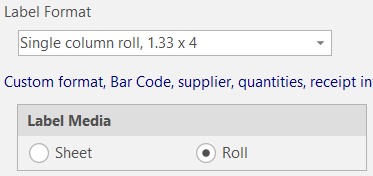
Tells ShopPAK if you are printing on sheet or roll stock. Your choice populates the choices found in the Label Format drop down list.
Note: Different label sizes permit different amounts of information. Experiment to find the label size that gives you the information you need.
Generating material labels is a separate and distinct step from actually printing labels. You can generate material labels from the PO Builder , Purchasing, Receiving, and Inventory main tabs via the ‘Generate Labels’ button or in some instances, from a ‘Generate Labels’ menu command.