
Job Assignments Grid Pop Up Menu Commands
Right mouse click the ‘Job Assignments’ grid to display the Job Assignments grid’s pop up menu:
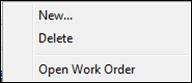
New
Creates a new job assignment for the selected PO Item row. This command is identical to the PO Item Grid pop up menu command -> “Add Job Item Assignment” explained on pages 13 – 15 in this chapter.
Delete
1. Select the Job Assignment you want to delete.
2. Right mouse click the “Job Assignments” grid. Select “Delete” from the pop up menu.
3. This displays a warning message. Select “Yes” to delete the Job Assignment. Click “No” to cancel the deletion.
Open Work Order
A handy feature is automatically opening a work order from the Job Assignments grid.
1. Select the work order you want to open in the Job Assignments grid.
2. Right mouse click the grid to display the pop up menu.
3. Select “Open Work Order” from the menu.
4. ShopPAK navigates to the Jobs tab and opens the requested work order.