
Invoice
The fourth tab holds the Invoice default document printing instructions.
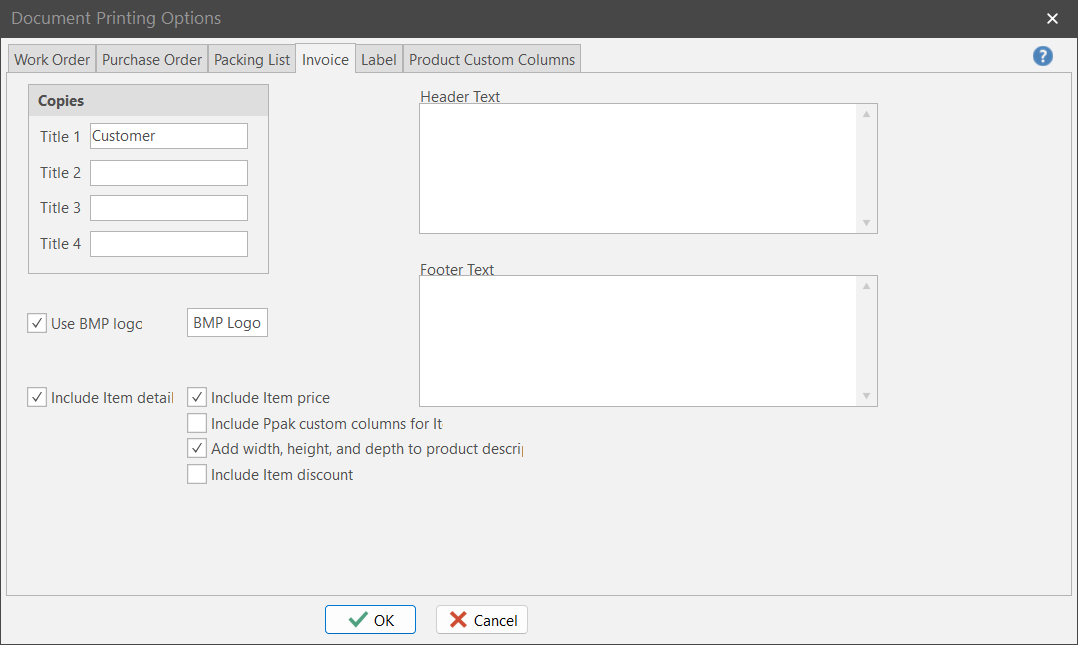
Copies
Print up to 4 copies of a given Invoice. Give each copy a unique title.
Use BMP Logo
Tells ShopPAK that you want to print your company logo at the top of the invoice. ShopPAK reads BMP file format. Use the “BMP Logo” button to identify the BMP file that contains your business logo, and the position you want to print the logo.
Include Item details
Tells ShopPAK that you want to include additional line item details when printing billing items.
Include Item price
Tells ShopPAK to include price when printing billing line items.
Include Ppak custom columns for Items
Tells ShopPAK to also print billing item custom column information.
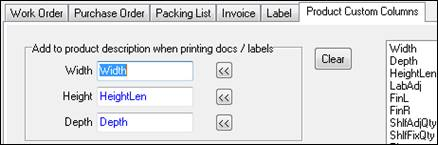
Add Width, Depth, and Height to Product Description
Tells ShopPAK if you want to append width, depth, and height to billing items when printing.
Use ‘Product Custom Columns’ to identify custom columns correspond to Width, Height, and Depth.
Include Item discount
Tells ShopPAK to print an item level discount when printing a regular invoice.
Note: Discounting is ONLY available for regular billing (generated from the ShopPAK ‘Billing’ tab. It does not apply to Progress Billing (generated from the Jobs | Progress Billing tab).
|
Header Text
Free form text that you want printed towards the top of the packing list.
Footer Text
Free form text that you want printed towards the bottom of the packing list.