
Generating a Quote Request
There are three ways to generate a quote request: Previewing, Printing, or Emailing.
Preview a Quote Request
Click the Preview  speedbar button, or select File | Preview from the menu to preview a quote request. Note, ShopPAK generates one quote request for each vendor. If a vendor supplies multiple materials, ShopPAK will gather up and list all materials for a given vendor.
speedbar button, or select File | Preview from the menu to preview a quote request. Note, ShopPAK generates one quote request for each vendor. If a vendor supplies multiple materials, ShopPAK will gather up and list all materials for a given vendor.Print a Quote Request
Click the Print  speedbar button, or select File | Print from the menu to send the quote request to a printer. Note, ShopPAK generates one quote request for each vendor. If a vendor supplies multiple materials, ShopPAK will gather up and list all materials for a given vendor.
speedbar button, or select File | Print from the menu to send the quote request to a printer. Note, ShopPAK generates one quote request for each vendor. If a vendor supplies multiple materials, ShopPAK will gather up and list all materials for a given vendor.Printing a quote request automatically changes status from Pending to Sent.
Email a Quote Request
Clicking the email button  automatically generates a PDF of the quote request (per vendor), launches your email client, creates an email, and attaches the quote request PDF to the email.
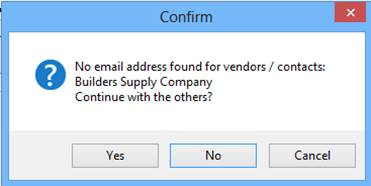
automatically generates a PDF of the quote request (per vendor), launches your email client, creates an email, and attaches the quote request PDF to the email.ShopPAK will create one email for each vendor participating in the Quote Request. Email addresses come from either the ProjectPAK vendor contact record, or the ProjectPAK vendor record. If an email doesn't exist, ShopPAK warns you with the following message…
Emailing a quote request automatically changes status from Pending to Sent.