
Emailing Alerts
Generated alerts can always be viewed via the Alert Browser, unless of course, they’ve been deleted. ShopPAK can also email them to you if you wish. If you want any of your alerts emailed, simply choose the appropriate email frequency when setting up your alert request:
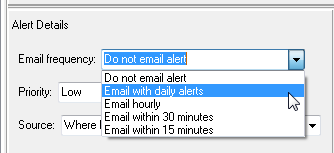
Any option other than “Do not email alert”, tells ShopPAK you want the alert emailed to you. ShopPAK batches all requested and newly generated alerts into a single email message. For example, if you selected “Email with daily alerts” for all your alert requests, you’ll receive one email a day and it will have all your generated alerts for the day. If you choose to be emailed more frequently, you’ll receive periodic emails during the day that list newly generated alerts.
Note: A generated alert is only emailed once.
|
Don’t forget to enter your email address via the Define | Alerts setup dialog box:

Below is a partial example taken from an alert email. ShopPAK organizes alerts by alert type, and within alert type by relevant criteria. In the example below, job alerts are sorted by job, and within job, by alert priority……
*******************************
Jobs
*******************************
-------------------------------
1178 - South Davis Hospital
-------------------------------
Low
--------------------------------------------------------------
4:38 PM 09/26/12
Action Item's 'need by' date is 2 days ago.
Job: 1178 - South Davis Hospital. Action Item: Need to check color sample for Base cabinet in room 132.
--------------------------------------------------------------
-------------------------------
1171 - North Memorial Hospital
-------------------------------
Medium
--------------------------------------------------------------
4:38 PM 09/26/12
Work Order 1340 scheduled start date is 3 days ago but Work Order status is Pending.
Job: 1171 - North Memorial Hospital. Job Item: 5 - Nurses Station.
--------------------------------------------------------------
4:38 PM 09/26/12
Work Order 1341 scheduled start date is 1 day ago but Work Order status is Pending.
Job: 1171 - North Memorial Hospital. Job Item: 6 - Engineering.
--------------------------------------------------------------
Low
--------------------------------------------------------------
4:38 PM 09/26/12
Work Order 1338 scheduled finish date is 10 days from today but Work Order status is Engineering.
Job: 1171 - North Memorial Hospital. Job Item: 3 - Room 141, 142, 144, 146, & 148.
-------------------------------
4:38 PM 09/26/12
Work Order 1339 scheduled finish date is 10 days from today but Work Order status is Purchasing.
Job: 1171 - North Memorial Hospital. Job Item: 4 - Room 152, 154, 156, 158 & 160.
--------------------------------------------------------------