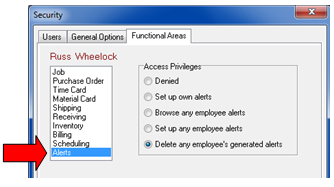
Alert Security Settings
Select Define | Security from the ShopPAK menu to display the Security dialog box. For each ShopPAK user, set their Alert Access Privilege. If a user doesn’t use alerts, click ‘Denied’. Else, set the appropriate security level to specify what the user is allowed to do regarding alerts.
Note: Only users that have an access level greater than ‘Denied’ show up in the Alert Setup dialog box’s user list à Define | Alerts.
|