
Alert Global Option Setup
Located on the ShopPAK Options Misc tab ( Define | ShopPAK Options) are setup options for the Alert Generator. Note, for most ShopPAK customers, the Alert Generator will be installed on their server. When filling in email information, make sure that you enter appropriate settings for the server, not your personal email settings.
Generate Alerts
This is the Alerts ‘master switch’. If you want ShopPAK to monitor and generate alerts, place a check into the checkbox. If you want to turn off alert generation, un-check it.
Daily Alerts Run Time
The Alert Generator runs 24/7 monitoring ShopPAK looking for situations that trigger alerts. There is a special class of alerts, however, that deal with dates and the calculation of number of days. We only generate these type of alerts once a day, normally after midnight when the calendar date has changed. The ‘Daily alerts run time’ is the directive that tells the Alert Generator when to check for these types of alerts. We recommend choosing a time past midnight, but sometime before employees arrive for work in the morning.
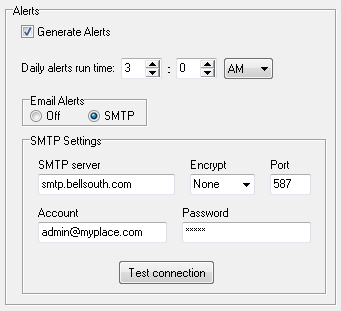
Email Alerts
Tells the Alert Generator if at least one user in the organization wants their alerts emailed back to them. If so, click “SMTP”. This displays SMTP Settings that tell the Alert Generator how to generate email.
SMTP Server
Address of your email server.
Encrypt
3 values are available: None, SSL, SSL/TLS. Choose correct encryption you use.
Port
Port number used for emailing.
Account
This is the “from” email account the Alert Generator uses when sending email.
Password
Password used for the “from” email account.
Test Connection
Tests the SMTP email values you’ve entered. If the test connection is successful, then the Alert Generator should be able to send email using the same email parameters.