
Actuals
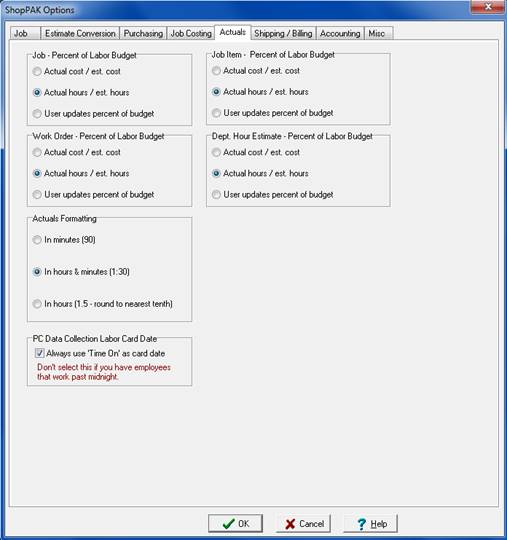
Percent of Labor Budget Calculation
Percent of budget is an important job tracking percentage. Use it to see the labor actuals you’ve collected to date, relative to the estimated labor budget.
ShopPAK automatically calculates the percentage as labor actuals are collected. Two automated options are available:
-
Use actual and estimated labor hours to calculate percent of budget.
-
Use actual and estimated labor dollars to calculate percent of budget.
ShopPAK tracks “Percent of Budget” at 4 levels:
-
Job
-
Job Item
-
Work Order
-
Work Order Departments
Set the “Percent of Budget” approach you wish to use at each level.
Actuals Formatting
Tells ShopPAK how you want labor hour actuals displayed:
-
In Minutes (e.g. 95 minutes)
-
In Hours and Minutes (e.g. 1:35)
-
In Hours with a decimal - rounded to one decimal place - (e.g. 1.6)
PC Data Collection Labor Card Date
Tells ShopPAK shop floor data collection routines to use the day that an employee logs on to a work order as the date of the transaction. Only choose this option if you don’t have a second shift that runs past midnight of a given day.