
ShopPAK Accounting Setup Options
In ShopPAK, selecting Define | ShopPAK Options from the menu displays the “ShopPAK Options” dialog box. Click the “Accounting” tab to define your accounting oriented default settings.
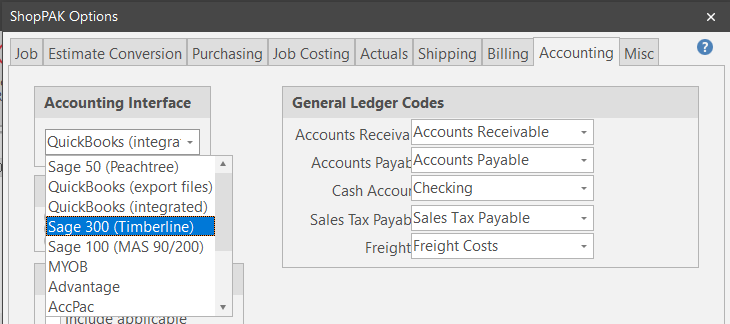
Accounting Interface
Choose your accounting package from the list of supported interfaces.
Note: QuickBooks (export files) works like the other accounting interfaces. ShopPAK creates an export file and it is imported into QuickBooks in a second step. The QuickBooks (integrated) option writes directly to the QuickBooks database. We recommend choosing this option if you have QuickBooks. It requires that you set up QuickBooks to allow TradeSoft access to your QuickBook’s database.
|
General Ledger Codes
Choose corresponding GL account codes for the five default GL account codes listed. ShopPAK needs to know which GL account code represents ‘Accounts Receivables’, ‘Accounts Payable’, etc., so it can build interface records correctly.