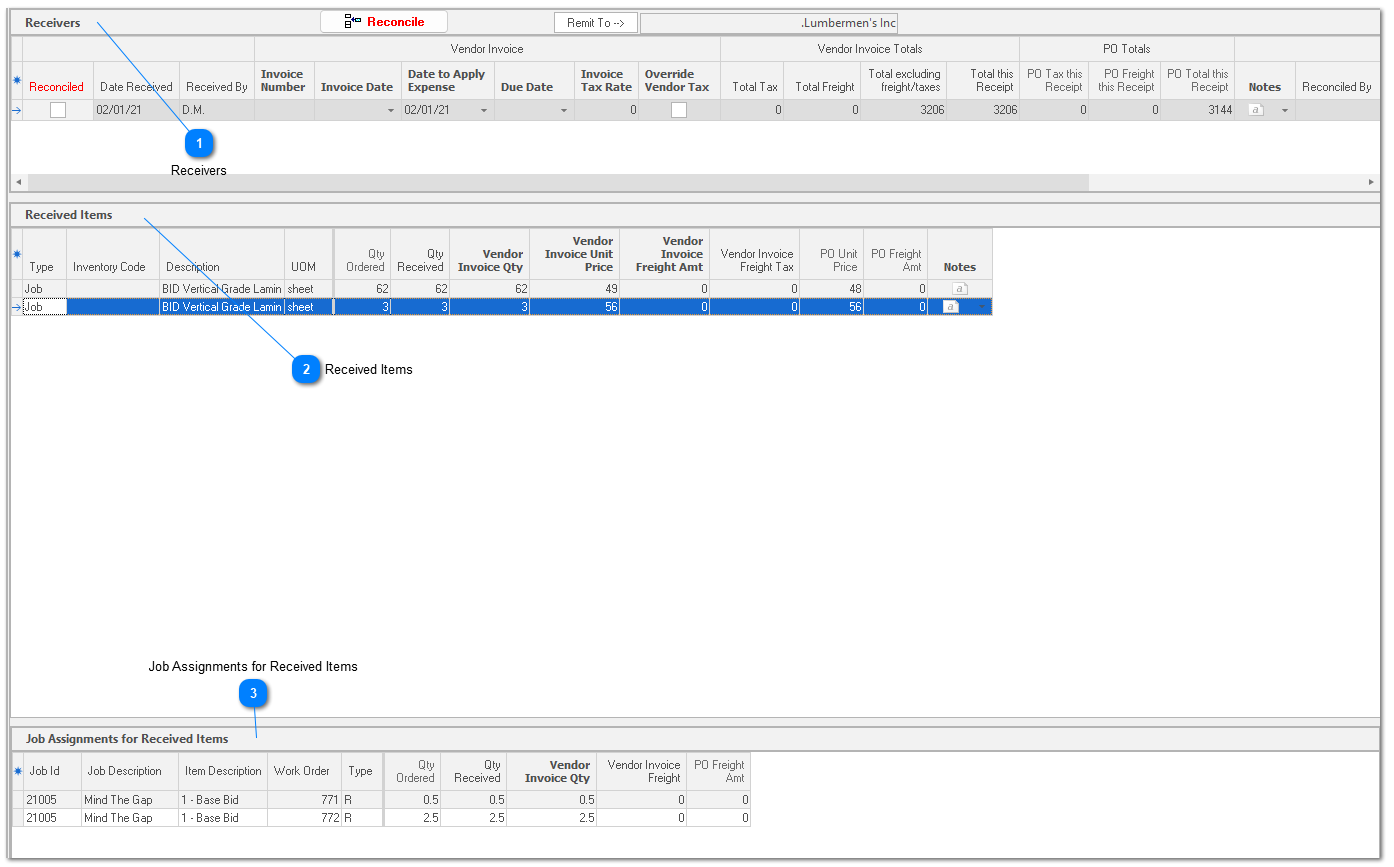
ReceiversWhen you receive a shipment against a purchase order, ShopPAK automatically creates a distinct ‘Receiver’ record. When reconciling a vendor invoice, you don’t change the original purchase order information. Instead, you use the “Reconciliation” sub tab to record any variance between the anticipated vendor invoice and the actual vendor invoice. This gives you a clear and accurate audit trail between the PO and the reconciled vendor invoice. For each distinct delivery you receive against a purchase order, ShopPAK generates a distinct ‘Receiver’ record. Most of the columns in the ‘Receivers’ grid are read-only (blue font) and are populated either from the purchase order, the receiver, or from other cells in the ‘Reconciliation’ sub tab. Enterable fields use black font.
Reconciled
Read only. If reconciled there is a check. If not reconciled, the checkbox is empty.
Date Received
Read only. Date the shipment was received.
Received By
Read only. Person that received the shipment.
Vendor Invoice Number
Required. The vendor’s invoice number.
Vendor Invoice Date
Date on the vendor invoice.
Date to Apply Expense
When you reconcile the vendor invoice by clicking the “Reconcile” button, if this cell is empty ShopPAK puts the current date into the cell. If for some reason, you need to pre or post date when you want ShopPAK to recognize material expense associated with this shipment, override accordingly.
Due Date
Optional, but if you export AP Bills to your accounting package, you can include a due date. ShopPAK automatically calculates due date if you’ve supplied a ProjectPAK ‘Number of Days Due’ on the purchase order’s Vendor record.
Vendor Invoice Tax Rate
Tax rate the vendor has used on their invoice.
Override Vendor Tax
When blank, you enter the tax rate and ShopPAK calculates total tax. When checked, you enter the vendor tax amount (tax rate is disabled).
Vendor Invoice Total Tax
Read only, unless Override Vendor Tax is checked. Total invoice tax amount for the Receiver.
Vendor Invoice Total Unit Price
Read only. Total invoice amount minus any tax and freight charges. Bubbles up from the ‘Received Items’ area.
Vendor Invoice Total Freight
Read only. Total invoice freight amount from the ‘Received Items’ area.
Vendor Invoice Total This Receipt
Read only. Total invoice amount from the ‘Received Items’ area.
PO Tax This Receipt
Read only. Total PO tax based on PO tax and the items and quantities received.
PO Freight This Receipt
Read only. Total PO freight based on PO freight and the items and quantities received.
PO Total This Receipt
Read only. Total PO amount based on PO amount and the items and quantities received.
Notes
Receiver notes. However, we’ve made this editable in case the person reconciling the vendor invoice wants to add a note.
Reconciled By
Read only. Person that reconciled the vendor invoice.
Date Reconciled
Read only. Date the vendor invoice was reconciled.
Date Exported
Read only. Date the reconciled vendor invoice was exported to an accounting package.
Exported By
Read only. Person that exported the reconciled vendor invoice to an accounting package.
Remit To
Read only. Vendor that you’ll remit payment to. Defaults to the purchase order vendor, however, you can override by clicking the “Remit To” button at the top of the window.
|