
Purchasing
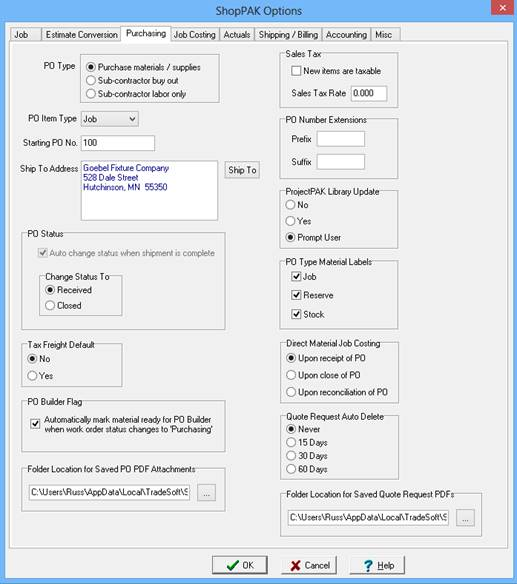
PO Type
Default PO Type to use on a new purchase order:
· Purchase Materials / Supplies
· Sub-Contract material Buy-Out
· Sub-Contract Labor
PO Item Type
Default PO Item Type to use when adding a new PO Line Item:
Job PO Item is being purchased for a particular job or jobs.
Stock PO Item is being purchased for inventory.
Reserve PO Item will be placed into inventory, but it is being reserved for a particular job
or jobs.
None Not being bought for a job or to go into inventory.
Starting PO Number
The starting PO number you want printed on the first ShopPAK purchase order. ShopPAK manages PO numbers after that, making sure that the next sequential number is given to a new purchase order.
Ship To Address
Default ‘Ship To’ address that prints on a purchase order. Click the ‘Ship To’ button and find the correct ProjectPAK business address.
Change PO Status To
Select the value you would like ShopPAK to automatically change the PO Status to when the shipment is complete.
· Received
· Closed
Tax Freight Default
Determines if freight is a taxable item on new Purchase Orders.
Note: Freight tax amount associated with a direct material job purchase can be included in Use Tax Report cumulative totals by selecting the ‘Include Freight on Use Tax report totals’ setting located under the Accounting tab.

PO Builder Flag
Tells ShopPAK to automatically check all materials on a work order’s material sub-tab as ‘Po Builder Ready’ when they user changes the work order status to ‘Purchasing’.
Folder Location for Saved PO PDF Attachments
Tells ShopPAK where you want it to save generated Purchase Order PDF attachments.
New Items Are Taxable
Default sales tax checkbox setting when you add a new PO Line Item. If you typically pay sales tax on PO Line Items, place a check in the checkbox. If not, leave blank.
Sales Tax Rate
Default sales tax percentage when creating a new purchase order.
ShopPAK will use the ProjectPAK Vendor record sales tax percentage when generating a purchase order. If a ProjectPAK Vendor record doesn’t include a specific sales tax percentage, ShopPAK uses the default sales tax percentage defined here in ShopPAK Options.
PO Number Extension
If PO numbers require a prefix or a suffix, enter the extension(s). The prefix will be printed immediately before the PO Number, and the suffix is printed immediately after the PO number.
ProjectPAK Library Updates
Determines if ShopPAK updates the ProjectPAK library when a user changes a PO Item cost that was copied from the ProjectPAK Library:
Never No
Always Yes
Prompt ShopPAK displays a message box, asking if the user wants to update the
associated ProjectPAK library item. It displays the message box every time
the user changes a PO Item price that is associated with the ProjectPAK
library.
PO Type Material Labels
Default “Print Label” checkbox. ShopPAK checks this directive so it knows which PO Item types it should automatically flag as needed a material label.
Job Mark new PO Items with a type of “Job” as getting a material label.
Reserve Mark new PO Items with a type of “Reserve” as getting a material label.
Stock Mark new PO Items with a type of “Stock” as getting a material label.
Direct Material Job Costing
The default “direct material purchasing” directive tells ShopPAK when to apply cost back to jobs. Every ShopPAK Job must indicate how direct material purchasing should work when PO Line Items have a type of “Job”. Use this setting to determine when costs associated with direct material purchase costs are allocated back to jobs.
Upon receipt of PO Job Costs are calculated and applied to Jobs when a PO is 'Received' via the “Receiving” tab. It doesn’t matter if the shipment was received in total or backordered. The cost associated with the received materials is applied to the job upon receipt.
Upon close of PO Job Costs are calculated and applied to Jobs when the
PO is 'Closed'.
Upon reconciliation of PO Job Costing is delayed until the Vendor Invoice arrives
and is reconciled against the purchase order ‘Receiver’. This takes place on the Purchase Order “Reconciliation” sub tab.
Quote Request Auto Delete
Tells ShopPAK if you want it to automatically delete old quote requests, and if so, how long before it deletes them for you.
Folder Location for Saved Quote Request PDFs
Tells ShopPAK where you want it to save generated Vendor Quote Request PDF attachments.