
General Work Order Reports
WORK ORDER
Prints the work order based on the work order default or override printing instructions. ShopPAK generates up to 4 distinct copies based on the number of work order titles you’ve defined in your document setup instructions. Experiment with different options to discover the best work order document layout for your shop.
NOTE: An alternative to printing individual work orders is to print a work order list. This option is available at the Job or Job Item levels. Refer to the Job and Job Item chapters for more details.
|
Product Labels
Prints all of the product labels that have been requested for the work order. Product labels are defined at the Product level of the Job Tree or on the Work Order “Products” sub tab. Labels are formatted to print on different Avery Label sheet stock. See page 16 in this chapter for instructions on setting up Work Order product labels and label print quantities.
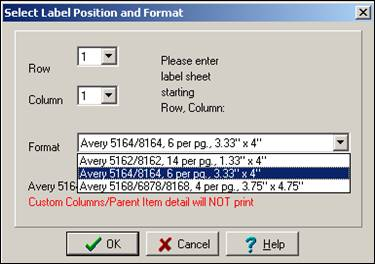
When you select “Product Labels”, the label printing dialog box is displayed so you can indicate where label printing should start on the first page of the label stock, as well as, what label size you want to print.