
Department Templates
Department templates speed the process of creating work order department and labor operations. We recommend users estimate labor in ProjectPAK so ShopPAK automatically populates work order departments and operations with estimated labor from ProjectPAK. However, if you don’t estimate labor in ProjectPAK, or you have a ‘Time and Materials’ job that you enter directly into ShopPAK, department templates are a handy way of quickly adding work order labor routings.
For more information on copying department templates into a work order department and operation grid, see “Chapter 8 – Work Order Form”, page 23.
To define or modify a work order department template, select Define | Department Templates from the ShopPAK menu. This displays the “Department Template dialog box:
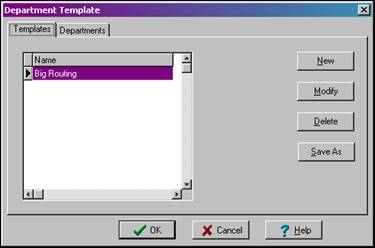
Click “New” to define a new department template name. To actually identify the departments and operations associated with a particular template, highlight the ‘Template Name’ and click the “Departments” tab.

Adding a new Department / Operations to a department template
1. Click the “New” button to add a new department to the template list.
2. Select the department you want to add from the ‘Dept’ pick list.
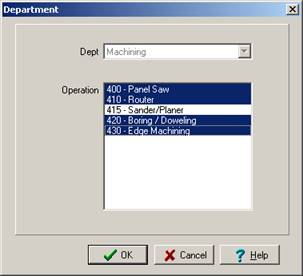
3. ShopPAK displays the list of operations defined for the selected department.
4. Holding down your control key, select the operations you want included under the department.
5. Click the “OK” button.
When you copy a department template into a work order department grid, ShopPAK creates not only the department grid entries based on the template, it also fills in the operations tab with all of the corresponding labor operations.